Good to know
Help & guides
Simply explained
Base mod + packs. One mods folder.
How to use finished Paint Packs.
Download
Download the free base mod and the Paint Packs you like.
Into the mods folder
Put the base mod and every Paint Pack as a zip into the same FS25 mods folder.
Activate in game
Activate the base mod and Paint Packs in your savegame. Pick the paint job in the shop or workshop.
Important: do not unpack the zips. Keep the base mod and Paint Packs zipped.
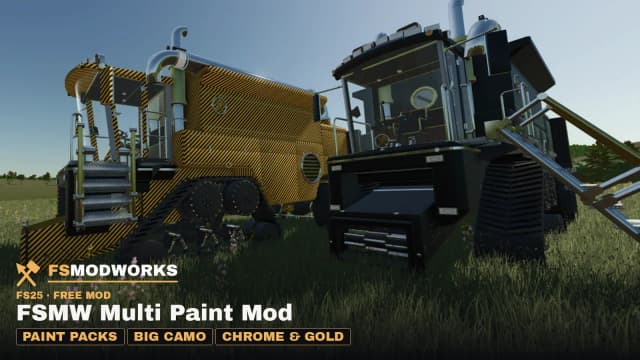
The FSMW original
FSMW Multi Paint Mod: Free base mod
Version 1.4.4.0
The free FSMW Multi Paint Mod adds Paint Packs as extra paint jobs to your vehicles. On almost every vehicle mod with a colour choice you get colour, patterns up to large camo, chrome, gold and brass and a logo as a sticker; FSMW vehicles also take your own images as patterns. You pick it in the shop or the workshop.
FS25Mod zipMultiplayer
Three steps to get started
Add the base mod
Put the downloaded zip into your FS25 mods folder.
Add Paint Packs
Put your Paint Pack zips into the same mods folder. Keep every zip packed.
Activate and choose
Activate the base mod and Paint Packs in your savegame and pick the paint job in the shop or workshop.
Requirements
- Farming Simulator 25 (FS25), single player and multiplayer.
- Large camo on base game and mod vehicles: mod 1.4.0.0 or newer and FS25 version 1.25.
- Chrome, gold and brass on vehicle mods: mod 1.4.2.0 or newer.
- Paint Packs from the Studio need the mod version stated in the pack (modDesc).
- Mods folder: Documents\My Games\FarmingSimulator2025\mods
- The Multi Paint Mod and all Paint Packs need no Download Key.
What works where?
FSMW vehicles: Paint Packs work on the Emperor 9000 V2 (Solo and Rig) and on the Gold Kettenrad V1 and V2 Director's Cut, with everything the editor can do: patterns at real size, chrome, gold and brass. On the small Kettenrad the pattern is scaled down to fit. Our other vehicles get their paint surfaces with their next update, and new FSMW vehicles have them from day one.
Almost every vehicle mod with a colour choice (base game and other authors): colour, patterns from fine (33 cm) to large camo (up to 16 m per tile) and a logo as a flat sticker, plus chrome, gold and brass (mod 1.4.2.0 or newer). In our test with 1,701 installed mod vehicles, 1,635 got large camo, that is 96 %, including those with colour masks like the FS-Miner ones.
Mainly vehicles whose paint sits on their own shader get no pattern. They keep their paint and the mod writes the reason to the log. The pattern can jump at seams and edges, because every vehicle splits its surfaces differently.
Large camo on other vehicles is tied to FS25 version 1.25. When a major game update arrives (for example 1.26), the mod switches it off there until we have updated it. Everything keeps working on FSMW vehicles.
Updates: FSMW Multi Paint Mod
Current version 1.4.4.0
Version 1.4.4.0
Hotfix: Paint Packs for all vehicles (like your own uploads) now also work on our FSMW vehicles: Emperor, Baron, Steward, Monarch, Squire, Marshal and the Gold Kettenrad. The pattern size is matched to each vehicle. Thanks to Jetspizza55 for the report. The editor preview now shows the real in-game pattern size.
Version 1.4.3.0
Hotfix: lettering up to 6 m, with sliders to set its position (left alone, the mod finds the spot itself). Lettering on the Gold Kettenrad V1 and V2 DC. Paint Packs and the editor now know the paint and lettering areas of Baron 250, Steward 250, Monarch 900, Squire 900 and Marshal 900. All 7 official Paint Packs (version 1.2.0.0) now go on these vehicles too.
Version 1.4.2.0
Release: Paint Packs now go on vehicles only (no more pallets, big bags or objects). The large camo pattern works on 1,635 of the 1,701 vehicles we tested (96 %), including FS Miner vehicles. Chrome, gold and brass now also work on vehicle mods by other authors. A Paint Pack can use your own picture as a large pattern.
Version 1.3.2.0
Paint Packs for base game vehicles and mods by other authors (colour, fine pattern in a fixed 33 cm tile, logo as a flat sticker). The mod checks each vehicle on load and only offers what works there.
Version 1.2.0.0
Paint Packs now also work on the Gold Kettenrad V1 and V2 Director's Cut (pattern size scaled to the small vehicle). One Paint Pack can list several vehicles. All 7 Paint Packs updated for this.
Version 1.1.1.0
Real metal finishes: Paint Packs can now be chrome, gold or brass (livery metalness). Build them in the Paint Pack editor on this page.
Version 1.1.0.0
Pattern preview in the shop and the workshop (colour field and colour bar), pattern scale per paint job (Paint Pack format 2), new name FSMW Multi Paint Mod. Two new camo Paint Packs: Woodland Brown and Woodland Green.
Version 1.0.1.0
First release: Paint Packs as extra colours for the Emperor 9000 V2 (Solo and Rig), 1,000 per paint job in game, removed packs remembered, multiplayer check with an in-game notice.
What comes next
- More FSMW vehicles in the editor and in game, and the Kettenrad in the 3D preview too.
- Publish Paint Packs with your own image, with an image check.
- Stars and download counts, so the best paint jobs rise to the top.
- Dedicated surfaces for a logo and company name on the doors, tank and rear.
Want to build your own paint jobs?
Build your own Paint Packs in the Paint Studio and download them as a zip.
- Paint Studio in your browser, nothing to install
- Download your paint job as a zip
- Put the zip next to the base mod in the mods folder
You do not need the Studio to use finished Paint Packs. It is only for building and downloading your own.
Frequently asked questions
What does the FSMW Multi Paint Mod cost?
The mod and the Paint Packs are free. In game, a paint job costs 1,000, like a paint job in the workshop.
Which vehicles have paint jobs in the FSMW Multi Paint Mod?
Almost every vehicle mod with a colour choice, from the base game and other authors: colour, patterns up to large camo and a logo as a sticker. In our test with 1,701 mod vehicles, large camo worked on 1,635 (96 %). Chrome, gold and brass work on vehicle mods too, your own images as patterns on FSMW vehicles (Emperor 9000 V2, Gold Kettenrad V1 and V2 Director's Cut).
Does the FSMW Multi Paint Mod large camo work on mod vehicles by other authors?
Yes, from version 1.4 of the mod. It brings its own shader for that, so the pattern sits at real size from 0.25 to 16 m per tile. In our test with 1,701 mod vehicles it worked on 1,635 (96 %), colour-mask vehicles like the FS-Miner ones included. Finished Paint Packs for it are free; members build their own in the Paint Studio with the pattern size.
Why does my mod vehicle get no pattern from the FSMW Multi Paint Mod?
Usually its paint sits on its own shader. The mod detects this on load, leaves the paint as it is and writes the reason to log.txt. After a major FS25 update, large camo on other vehicles is off until the mod catches up.
Does the FSMW Multi Paint Mod work in multiplayer?
Yes. Every player needs the same Paint Packs as the server. If a player is missing a pack, the mod switches the paint jobs off and tells you in game which pack is missing. No errors.
What happens in the FSMW Multi Paint Mod if I delete a Paint Pack?
The vehicle runs in its standard paint, without errors. The mod remembers the old paint job: put the pack back into your mods folder and it is there again.
Can I make my own paint jobs with the FSMW Multi Paint Mod?
Yes, as a member in the Paint Studio on fsmodworks.com: pick a template, set colours and pattern size, check it in 3D on the vehicle, download the zip and submit it as a Paint Pack, up to 50 projects. A free account downloads every finished Paint Pack, official and from the community.
Your ideas. Your paint. By FSMW.