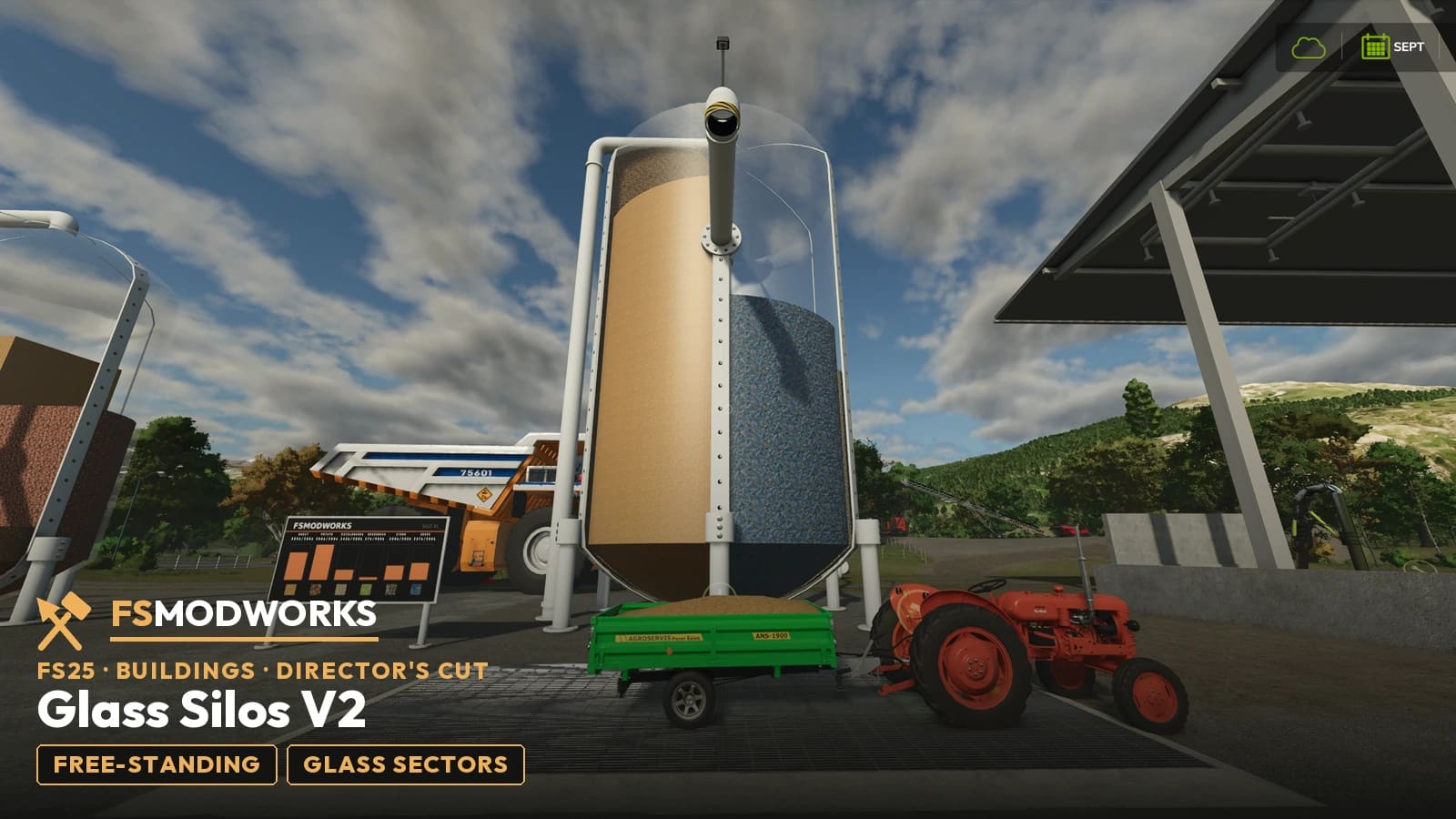
What are the FSMW Glass Silos?
Free-standing silo towers with transparent walls: the XL tower stores 3,000,000 liters in 6 vertical glass sectors, the L tower 1,000,000 liters in 4 — whatever you tip claims a free sector and rises visibly behind the glass, framed by steel bands with bolt heads. The chamber technology comes from the 1Hall4All V3 hall, without the hall around it.
Capacities
| Hall | Chambers | Per chamber | Total |
|---|---|---|---|
| FSMW Glass Silo XL - V2 DC | 6 | 500,000 l | 3,000,000 l |
| FSMW Glass Silo L - V2 DC | 4 | 250,000 l | 1,000,000 l |
What it does
The tower
A transparent cylinder with a rounded cap on top and bottom, standing on steel legs. Every material gets its own vertical glass sector that fills from the ground up; between the sectors run vertical steel bands with bolt heads, over the full height and across both caps. The silo TV panel shows one bar per sector, and the loading pipe is the same arm the V3 hall uses — high enough for a BELAZ 75601 to drive underneath.
Changelog
Questions and answers
FSMW Glass Silos V2 Director's Cut: I use FSG Mod Assistant or several mod folders. Where does the key file go?
Put the key file (.xml) once into Documents/My Games/FarmingSimulator2025/modSettings/FSMW/ (create the FSMW folder yourself). It then works for every mod folder, even when FSG Mod Assistant switches folders. If the key file sits in your mods folder, FSG Mod Assistant lists it as "Not a mod". That is normal, please don't delete it.
How are the Glass Silos V2 different from the V3 hall silo?
Same chamber technology, no hall around it: the Glass Silos are free-standing towers. The XL tower stores 3,000,000 liters in 6 vertical glass sectors, the L tower 1,000,000 liters in 4 — the V3 hall carries its chambers in the back wall of a full workshop hall with solar roof and wash portal.
Where do I get the Glass Silos V2, and what do I need?
Right here: sign in, and the download options on this page give you the mod zip and your Download Key. Both files go into your mods folder; the key unlocks the towers on the next game start.
Does FSMW Glass Silos V2 Director's Cut work in Farming Simulator 25?
Yes. FSMW Glass Silos V2 Director's Cut is built for Farming Simulator 25 (FS25), and that is the game it runs in.
Related products
- Glass Silo L V1 — the single-chamber silo without the panel, free
- 1Hall4All V3 Director's Cut — the workshop hall with the same glass chamber technology built into its back wall
- 1Hall4All V2 Director's Cut — the workshop hall with solar roof and moving wash portal
- FSMW Multi Digital Panel — the total across every building on one screen
Download options
You need TWO files — the mod zip and the Download Key. Both go into the same folder.
Push to your phone or PC. Only new FS25 mods, updates and big news.
Important — please read
- Terms and conditions
The terms under which you may use and pass on this mod.
Where does the Download Key go?
Put the downloaded .xml file into your mods folder — the same folder your mod zips live in (Documents/My Games/FarmingSimulator2025/mods). On the next game start the mod picks it up and stores it permanently under modSettings/FSMW/, where it survives every mod update. Nothing to type, nothing to rename.
You can also put the file straight into modSettings/FSMW/ — you will have to create that folder yourself.
Why at all: the key ties your copy to your account, so a re-upload can be traced back. Part of the code in the zip is encrypted for the same reason — the gameplay logic. Not a program, no .exe, no internet access. More in the FAQ